README
OpenRemote

Source · Documentation · Forum · Issues · Docker Images · OpenRemote Inc.
Welcome to OpenRemote; an intuitive user-friendly 100% open source IoT platform. You can build a complete IoT device management solution including: device management and auto provisioning, customisation of asset types, automation via when-then, flow, javascript and groovy rules, data analytics, connectivity via several protocol agents and manager APIs (e.g. MQTT broker, HTTP/REST, WS), Multi-tenancy (realms), Users and roles management, Edge gateway, Front-end UI web components and consoles, and an Insights dashboard builder.
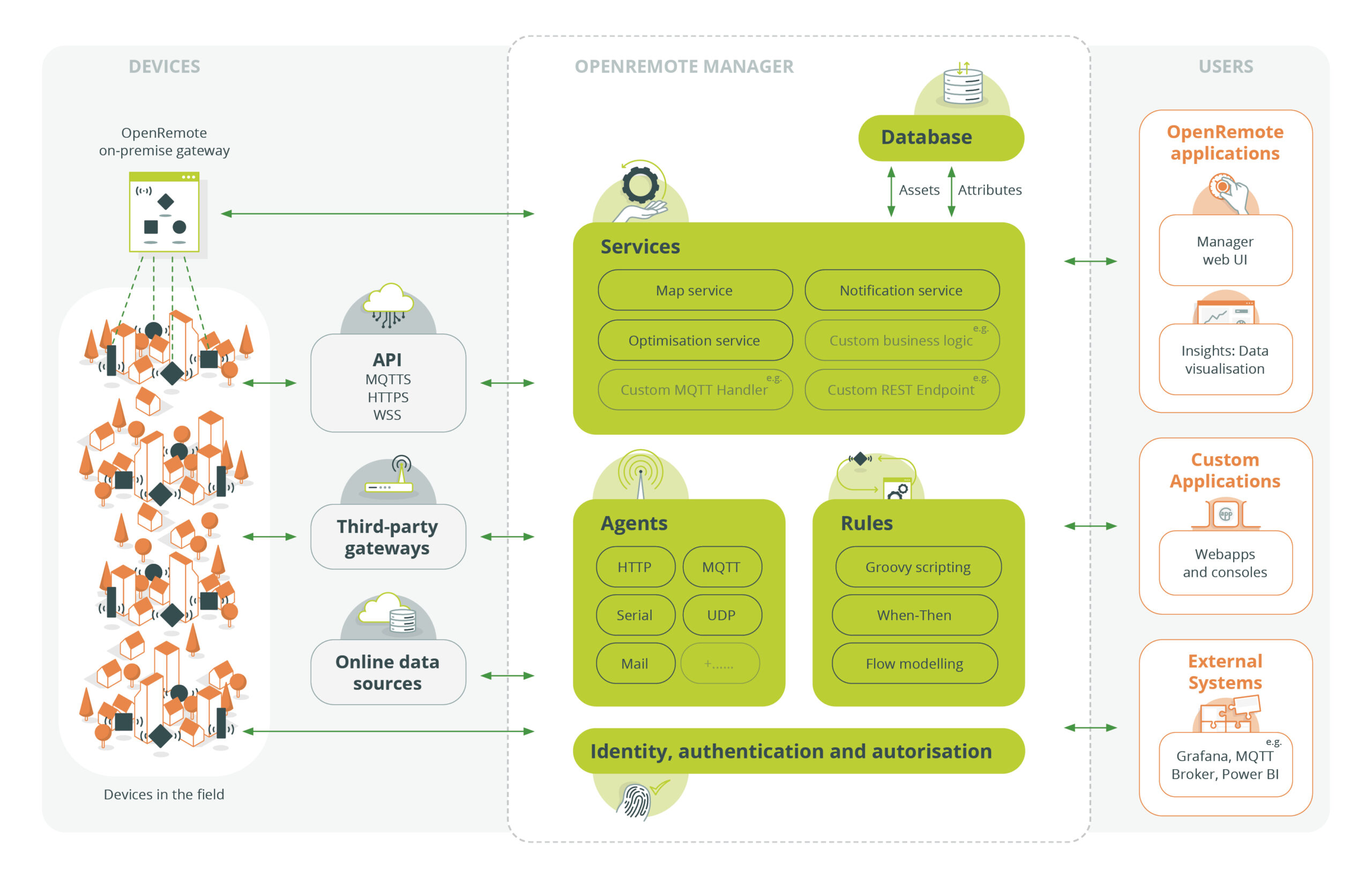
As the code base is 100% open source, applications are limitless. Here's an architecture overview:
Quickstart
You can quickly try the online demo with restricted access, login credentials are smartcity:smartcity:
The quickest way to get your own environment with full access is to make use of our docker images (both amd64 and arm64 are supported).
- Make sure you have Docker Desktop installed (v18+).
- Download the docker compose file: OpenRemote Stack (Right click 'Save link as...')
- In a terminal
cdto where you just saved the compose file and then run:
docker compose pull
docker compose -p openremote up
If all goes well then you should now be able to access the OpenRemote Manager UI at https://localhost. You will need to accept the self-signed